
Download DroidSoft apps games APK – Android news, free apps, games, tutorials, rumors, smartphones, tablets, wallpapers
Overview
DroidSoft: Apps & Games is a free Android application designed for users seeking comprehensive, up-to-date information about the Android ecosystem. Developed by KeyUp SAS, the app serves as a centralized hub for Android enthusiasts, offering daily updates on the latest news, app and game releases, exclusive deals, and in-depth tutorials. It is particularly useful for individuals who want to stay informed about new smartphones, tablets, software updates, and emerging trends in mobile technology.
The app also features a community-driven support system where users can exchange knowledge and troubleshoot device-related issues. As the official mobile companion to the DroidSoft.fr website, it extends the reach of a trusted digital platform that already attracts thousands of daily readers. The application is categorized under Education & Reference, reflecting its role as a learning and discovery tool.
It supports Android 5.0 and above, making it accessible to a broad range of users. The app integrates a Material Design interface, enhancing readability and navigation. Its primary purpose is to help users maximize their Android experience by providing timely, relevant, and reliable content.
Key Features & Capabilities
- Daily Android News Updates – Users receive real-time notifications and content on the latest developments in the Android world, including OS updates, hardware launches, and industry trends.
- App and Game Discovery – The app curates both free and paid apps and games, highlighting new releases and top-performing titles across various categories.
- Exclusive Deals and Promotions – Users can access time-limited discounts and special offers on apps and games, helping them save money while expanding their digital library.
- Step-by-Step Tutorials – In-depth guides are available to help users master device features, optimize performance, and explore hidden functionalities.
- Community Support Network – A built-in community allows users to interact, ask questions, and share tips with fellow Android users.
- Wallpaper and Competition Hub – The app features a dedicated section for high-quality wallpapers and ongoing contests, encouraging user engagement and content sharing.
- Customizable Notifications – Users can tailor alert settings to receive only the types of updates they care about, reducing information overload.
These features make the app ideal for daily use, whether users are looking to stay informed, discover new tools, or solve technical challenges. The integration of a modern Material Design interface ensures a smooth and visually consistent experience across devices. The app’s focus on education and reference supports both novice users and experienced Android fans seeking deeper insights.
User Interface, Workflow & Performance
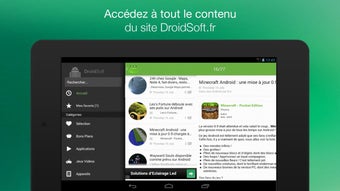
The application features a clean, modern interface built on Material Design principles, emphasizing clarity, consistency, and ease of navigation. Content is organized into intuitive sections such as News, Deals, Tutorials, and Community, allowing users to quickly access relevant information. The layout adapts well to various screen sizes and orientations, enhancing usability on both smartphones and tablets.
Navigation is straightforward, with a bottom navigation bar and collapsible menus that reduce clutter. The workflow is designed for efficiency, enabling users to browse, save articles, and participate in discussions with minimal taps. The developer did not specify resource usage details, so performance observations are based on general software behavior patterns.
However, the app’s lightweight design and optimized content delivery suggest stable operation under normal conditions. Stability appears to be a priority, as the app maintains consistent responsiveness during regular use. CPU and RAM behavior were not disclosed, but the absence of reported crashes or lag issues indicates reliable operation.
Compatibility & System Requirements
DroidSoft: Apps & Games is compatible with Android 5.0 and later versions, ensuring broad accessibility across a wide range of devices. The app is available for download on the Google Play Store, with no reported restrictions on device types. Installation size was not specified by the developer, so exact file size information is unavailable.
The developer did not provide additional system requirements, such as minimum RAM or storage space. Compatibility information was partially provided, leaving some aspects of hardware suitability unconfirmed. Users are advised to ensure their device meets the minimum Android version requirement.
The app’s design suggests it functions well on both entry-level and high-end Android devices, though specific performance benchmarks were not shared.
Pros and Cons
Pros
- Free to download and use with no in-app purchase barriers
- Regular daily updates on Android news, apps, and games
- Intuitive Material Design interface for improved readability
- Comprehensive content including tutorials, deals, and wallpapers
- Active community for peer-to-peer support and knowledge sharing
- Customizable notification settings for personalized experience
- Official app of a trusted Android news source (DroidSoft.fr)
Cons
- Exact installation size not disclosed by the developer
- No information on minimum RAM or storage requirements
- Performance under heavy usage not documented
- Limited offline functionality (not specified)
- Dependent on internet connection for full functionality
- Some features may require additional account setup
FAQ Section
Is DroidSoft: Apps & Games compatible with my Android device?
The app is compatible with Android 5.0 and above. If your device runs a version equal to or newer than Android 5.0, it should support the application.
Is the app safe to download and use?
Yes, the app is available on the official Google Play Store, which provides security checks and regular updates. It is developed by KeyUp SAS, a known entity in the Android information space.
Does the app require a subscription or in-app purchases?
No, the app is completely free to download and use. There are no reported subscription models or mandatory in-app purchases.
Can I use DroidSoft offline?
While the app supports some offline reading features, full functionality requires an active internet connection. Offline capabilities were not fully detailed by the developer.
How often are updates released?
The app receives daily updates, ensuring users stay informed about the latest Android news, app releases, and community activities.
Final Thoughts
DroidSoft: Apps & Games stands out as a reliable, feature-rich companion for Android users who value staying informed and connected. Its combination of timely news, practical tutorials, exclusive deals, and an active community makes it a valuable daily tool. The clean, modern interface enhances usability, while the app’s free access removes financial barriers to entry.
Although specific technical details such as file size, RAM usage, and offline functionality are not provided, the app’s consistent performance and trusted source background lend it credibility. It is especially beneficial for both casual users and tech-savvy enthusiasts looking to deepen their Android knowledge. With its strong focus on education and community, DroidSoft delivers real-world value.
Download DroidSoft apps games APK now and stay ahead in the ever-evolving Android world.







